MN-ITS billing, without the retyping
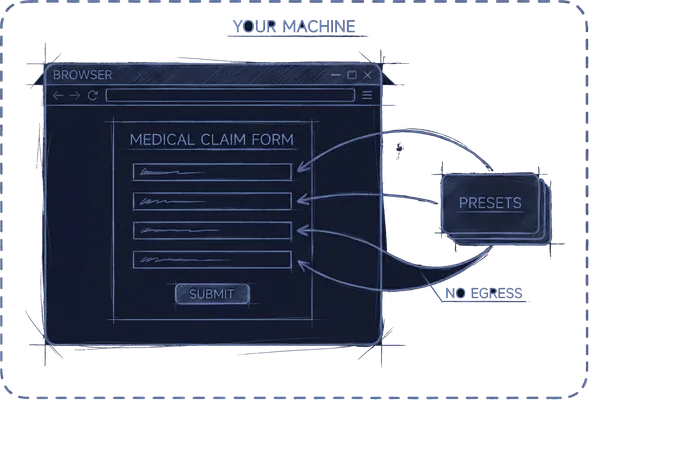
If your office bills Minnesota Health Care Programs through MN-ITS, somebody spends hours every cycle typing the same client information into the same Professional Claim screens. MN-ITS Helper is a Chrome extension that fills those screens from saved per-client presets, then stops at the review screen so a person checks and submits. It's the one product I've built and shipped on my own, and it's local-only by design: claim data never leaves your machine.
Book a 15-Minute Fit CallWatch it fill a claim
A real 14-day Professional Claim, filled start to review screen, shown in real time. Not sped up, not edited: what you're watching is exactly the time you get back.
How to use it
Five steps, and only the first one happens more than zero times per claim after setup:
Save each client once
In the extension's options, enter what never changes: member ID, date of birth, diagnosis and procedure codes, modifiers, place of service, units, charge amount. That's the last time anyone types it.
One-time setup, about two minutes per client.
Open a claim and pick your client
Log into MN-ITS the way you already do and start a Professional Claim. Click the Helper icon and pick the client from your list.
Pick the days you're billing
Consecutive mode takes a first and last date. Individual mode gives you a calendar to tap specific days, with a per-day unit count when a day differs. Whichever mode, these are the last clicks you make for a while.
Click Start and watch it type
Pages 2 through 6 fill themselves: subscriber lookup, claim header, diagnosis, then one service line for every day you picked. A status banner narrates each step as it lands.
What you just skipped on a 14-day claim: about 180 clicks and 560 keystrokes.
It stops at review. You submit.
The extension never clicks submit. Your biller sees the completed claim exactly as MN-ITS will receive it, checks it, and submits it themselves. Every single time.
The part that stays human.
One 14-day claim: about 560 keystrokes and 180 clicks, down to about five clicks.
Now multiply by every client, every billing cycle. You don't have to take the math on faith: the extension keeps its own running count of every click and keystroke it types for you, and you can watch it grow in its options page.
Counted the way the extension's productivity counter counts: one click per field, two per dropdown, characters as typed, on a Professional Claim with fourteen service dates, the typical two-week billing cycle.
What it costs
Priced by how many clients you bill in a month. Every plan is the same full extension: every feature, every update, no per-seat fees, no setup charge.
Starter
$65a month
Up to 4 clients a month
Basic
$120a month
Up to 8 clients a month
Standard
$220a month
Up to 16 clients a month
Plus
$300a month
Up to 24 clients a month
Start free: every plan begins with a 30-day trial. The full extension, unlimited clients, no card required.
How counting works: a client counts toward your plan the first time you fill a claim for them in a calendar month. Fill for the same client all month, it still counts once.
Billing more than 24 clients? Get in touch and we'll set up a plan that fits.
Also in the box
The parts a two-minute demo doesn't show:
Handles multiple locations and logins. Each location keeps its own MN-ITS login, and passwords stay where they already live, in Chrome's own password manager. The extension never stores them.
Backs up its own settings, encrypted. Client presets export as an encrypted backup file, so a new machine or a bad day doesn't mean rebuilding every client by hand.
Keeps score. A running counter in the extension's options shows every click and keystroke it has typed on your behalf since the day you installed it.
Your clients' data never leaves your machine
Most billing tools want your data on their servers. This one was built the opposite way on purpose:
No servers, no account, nothing to sign into. The extension is a folder in Chrome on your machine.
Client presets are stored locally in your browser. Claim data goes exactly one place: the MN-ITS portal your biller is already using.
The extension makes no outside network calls, and that rule is enforced by an automated test in its build process, not by a promise in a policy document.
Nobody at Mango Catalyst can see your clients' information. The software isn't built to send it anywhere, including to me.
That's not a compliance feature bolted on afterward. It's the architecture: software that handles sensitive information should keep it on the machine it came from.
Who it's for
Home care agencies, waiver service providers, therapy practices, and any Minnesota office that bills through MN-ITS and is tired of the retyping. It runs in Chrome on the computers your billers already use, and setup is measured in minutes, not weeks.
Want to see it on your screens?
Book the 15-minute call and bring a sample claim. We'll walk through what your billing cycle looks like, and whether the extension fits it, before you commit to anything. Curious what else can run itself? Here's the full list of what I build.
One 15-minute call. Bring your billing cycle, and I'll tell you straight whether the retyping can disappear.